How to create a login screen page in swift 3: authenticate an user and keep the session active
In this new swift 3 tutorial you'll learn through an example how to create a simple login sign in screen page, how to send the login information with the HTTP post method to your server to start a new session for your authenticated account and how to keep this session stored in your iOS device in order to keep it active and avoid to write email and password again.
Project initialization
Let's create a new swift ios single view project. Open the Main.storyboard and add two TextField elements and one Button. For the password TextField be sure to check inside the Attribute inspector the Secure text entry option.
Here how the basic login screen should be.
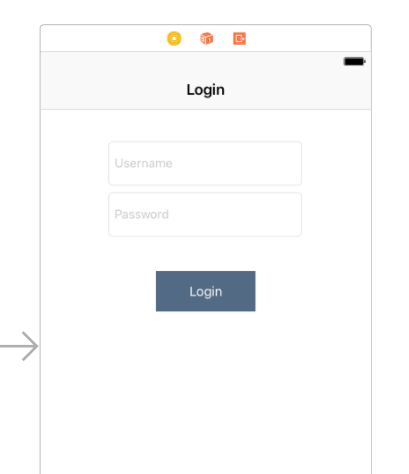
Using the Assistant editor let's link the three elements to three variables. In this example I'll call them: username_input, password_input and login_button. Link also the login button to an IBAction function. I'll call the IBAction login function as DoLogin.
The DoLogin function will take the login information written and will send it to the server with the HTTP post request. All the data will be sent using the Json format. Defines also the api url variables and the login_session variable, used to store the current session.
    let login_url = "http://www.kaleidosblog.com/tutorial/login/api/Login"
    let checksession_url = "http://www.kaleidosblog.com/tutorial/login/api/CheckSession"

    @IBOutlet var username_input: UITextField!
    @IBOutlet var password_input: UITextField!
    @IBOutlet var login_button: UIButton!

    var login_session:String = ""
As you can see from the above defined variables, we have two url for the authentication. The login_url is used to perform the login with the given username and password. The checksession_url is used to send the current session to the server and to ask if this session is a valid one.
Login process initialization
Let's fill the username and password with the account values (username: "try@me.com", password: "test"), to let us test a bit more quickly. As soon as the activity is ready, we have to check inside the device storage if there is a previus session to use. This session has to been to validate by sending it to the server using the checksession_url http post request.
    override func viewDidLoad() {
        super.viewDidLoad()


        username_input.text = "try@me.com"
        password_input.text = "test"


        let preferences = UserDefaults.standard
        if preferences.object(forKey: "session") != nil
        {
            login_session = preferences.object(forKey: "session") as! String
            check_session()
        }
        else
        {
            LoginToDo()
        }


    }
Login button
The login button will be used as login button and as logout button. The login button will call the login_now function with the written username and password values. The logout button will clear the session stored inside your ios device and will restore the input text field to the editable mode.
    @IBAction func DoLogin(_ sender: AnyObject) {

        if(login_button.titleLabel?.text == "Logout")
        {
            let preferences = UserDefaults.standard
            preferences.removeObject(forKey: "session")

            LoginToDo()
        }
        else{
            login_now(username:username_input.text!, password: password_input.text!)
        }

    }
Login function: let's sign in and authenticate to our server
Let's define the login_now function. This function will send, by using the http post method in an asynchronous way, the username and password parameters. The server will reply with a 200 response code and with the session string if the username and password are right. If the server recognizes the right login details, the app will store the session sent by the server. This string will be used later on for all the future requests, and as soon as the app is opened again, to check if the session is still active.
   func login_now(username:String, password:String)
    {
        let post_data: NSDictionary = NSMutableDictionary()


        post_data.setValue(username, forKey: "username")
        post_data.setValue(password, forKey: "password")

        let url:URL = URL(string: login_url)!
        let session = URLSession.shared

        let request = NSMutableURLRequest(url: url)
        request.httpMethod = "POST"
        request.cachePolicy = NSURLRequest.CachePolicy.reloadIgnoringCacheData

        var paramString = ""


        for (key, value) in post_data
        {
            paramString = paramString + (key as! String) + "=" + (value as! String) + "&"
        }

        request.httpBody = paramString.data(using: String.Encoding.utf8)

        let task = session.dataTask(with: request as URLRequest, completionHandler: {
        (
            data, response, error) in

            guard let _:Data = data, let _:URLResponse = response  , error == nil else {

                return
            }


            let json: Any?

            do
            {
                json = try JSONSerialization.jsonObject(with: data!, options: [])
            }
            catch
            {
                return
            }

            guard let server_response = json as? NSDictionary else
            {
                return
            }


            if let data_block = server_response["data"] as? NSDictionary
            {
                if let session_data = data_block["session"] as? String
                {
                    self.login_session = session_data

                    let preferences = UserDefaults.standard
                    preferences.set(session_data, forKey: "session")

                    DispatchQueue.main.async(execute: self.LoginDone)
                }
            }


        })

        task.resume()


    }


    func LoginDone()
    {
        username_input.isEnabled = false
        password_input.isEnabled = false

        login_button.isEnabled = true


        login_button.setTitle("Logout", for: .normal)
    }

    func LoginToDo()
    {
        username_input.isEnabled = true
        password_input.isEnabled = true

        login_button.isEnabled = true


        login_button.setTitle("Login", for: .normal)
    }
Session check function: let's check if the session is still a valid one and the user do not require to authenticate again
Once the app is opened, and if a previous session is stored, the app will send to the server its stored session, in order to check if this session is still a valid one and the sign in login process is not required. In order to do this, the app will call the checksession_url http post request with the session. If the session is still a valid one, in this example the server will response with a 200 response code, otherwise the login process is required.
    func check_session()
    {
        let post_data: NSDictionary = NSMutableDictionary()


        post_data.setValue(login_session, forKey: "session")

        let url:URL = URL(string: checksession_url)!
        let session = URLSession.shared

        let request = NSMutableURLRequest(url: url)
        request.httpMethod = "POST"
        request.cachePolicy = NSURLRequest.CachePolicy.reloadIgnoringCacheData

        var paramString = ""


        for (key, value) in post_data
        {
            paramString = paramString + (key as! String) + "=" + (value as! String) + "&"
        }

        request.httpBody = paramString.data(using: String.Encoding.utf8)

        let task = session.dataTask(with: request as URLRequest, completionHandler: {
            (
            data, response, error) in

            guard let _:Data = data, let _:URLResponse = response  , error == nil else {

                return
            }


            let json: Any?

            do
            {
                json = try JSONSerialization.jsonObject(with: data!, options: [])
            }
            catch
            {
                return
            }

            guard let server_response = json as? NSDictionary else
            {
                return
            }

            if let response_code = server_response["response_code"] as? Int
            {
                if(response_code == 200)
                {
                    DispatchQueue.main.async(execute: self.LoginDone)


                }
                else
                {
                    DispatchQueue.main.async(execute: self.LoginToDo)
                }
            }


        })

        task.resume()


    }
Here you'll find the swift 3 project for this example: download.
Comments 25
Comments are closed: this is a read-only archive.
Can you please share server side code also for the authentication?
thank you for that very useful tutorial.
As many others too, I would be thankful, if you can provide the code of the server.
Do you use the FOS User Bundler or did you produce the code on your own?
Thank you very much!
Sebastian
Thanks for you answer.
Jean-François.
thanks
let url:URL = URL(string: login_url)!
and
let url:URL = URL(string: checksession_url)!
??? I don't understand. I'm new to SWIFT.... and I gotta say - I wish I Phones worked with Android code.
App Transport Security has blocked a cleartext HTTP (http://) resource load since it is insecure. Temporary exceptions can be configured via your app's Info.plist file.
2018-07-30 17:32:33.442622+0200 LoginScreen[10563:690603] Cannot start load of Task <00A2C023-BF1B-4519-B9F2-62CC88C406DA>.<1> since it does not conform to ATS policy
2018-07-30 17:32:33.443115+0200 LoginScreen[10563:690608] Task <00A2C023-BF1B-4519-B9F2-62CC88C406DA>.<1> finished with error - code: -1022
Add this in your Info.plist file
NSAppTransportSecurity
NSExceptionDomains
example.com
NSIncludesSubdomains
NSTemporaryExceptionAllowsInsecureHTTPLoads
NSTemporaryExceptionMinimumTLSVersion
TLSv1.1
2018-08-16 16:27:01.803596+0700 LoginScreenApp[4547:644259] CredStore - performQuery - Error copying matching creds. Error=-25300, query={
class = inet;
"m_Limit" = "m_LimitAll";
ptcl = htps;
"r_Attributes" = 1;
sdmn = "Email / ID Finger Kosong";
srvr = "database.domain.net";
sync = syna;
}
Having seen your server side scripts I was wondering how the best practise should look here.
Your simplified code indicates to have passwords stored on server side, let's say mongoDB.
I assume for security reasons this would not be the best choice, would it? For my understanding one would save the session which would be the hash value of the password.
Any proposal? Thanks ANdre