NSURLSession in Swift: get and post data
In this new Swift 2 tutorial you'll learn how to use the NSURLSession Swift function. You'll see different examples that illustrate how to define the different NSURLSession methods in various scenario, for downloading data or sending post requests.
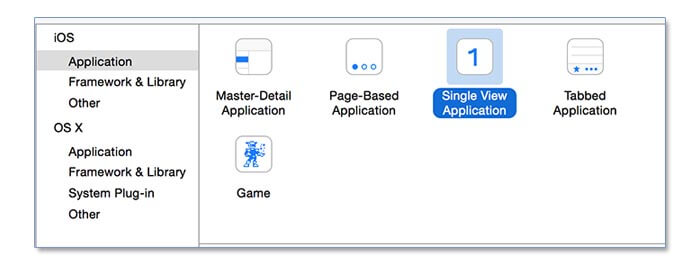
Let's start this new tutorial by creating a new Swift iOS single view application.
For this tutorial we'll use iOS 9 as a deployment target and the examples are based on a server side script to get the data located on the server that does not have the https, so, for this reason, we have to edit the info.plist file, in order to allow this domain.
Edit the Info.plist to allow an http domain
Right click on the info.plist file, select open as, Source code. Add the lines of code that allow the http connection to this server.
    <key>NSAppTransportSecurity</key>
    <dict>
        <key>NSExceptionDomains</key>
        <dict>
            <key>www.kaleidosblog.com</key>
            <dict>
                <key>NSTemporaryExceptionAllowsInsecureHTTPLoads</key>
                <true/>
            </dict>
        </dict>
    </dict>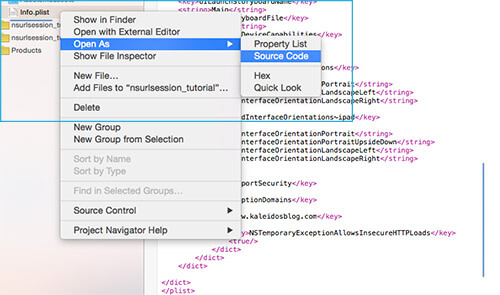
The NSURLSession is an asynchronous function and has three main principal methods:
- dataTaskWithUrl - dataTaskWithRequest
- downloadTaskWithUrl - downloadTaskWithRequest
- uploadTaskWithUrl - uploadTaskWithRequest
The dataTaskWithUrl is for normal data requests (when for example you'll have to ask to a web server for some data).
The downloadTaskWithUrl is for downloading files. It can resume the downloads for you and, as soon as the data is ready you'll have the temporary path in which the data is stored.
The uploadTaskWithUrl is for uploading data.
Server definition
The server in this example receives the data through a post request and simply replies it back. The post parameter has this format:
Post Request : 'data' > String
In this way we'll see if everythings works fine.
The url for the requests is located at this address:
http://www.kaleidosblog.com/tutorial/nsurlsession_tutorial.php
In swift I've defined a constant variable with this url, called url_to_request.
NSURLSession: dataTaskWithUrl example
Let's start this example with the dataTaskWithUrl function.
    func data_request()
    {
        let url:NSURL = NSURL(string: url_to_request)!
        let session = NSURLSession.sharedSession()

        let request = NSMutableURLRequest(URL: url)
        request.HTTPMethod = "POST"
        request.cachePolicy = NSURLRequestCachePolicy.ReloadIgnoringCacheData

        let paramString = "data=Hello"
        request.HTTPBody = paramString.dataUsingEncoding(NSUTF8StringEncoding)

        let task = session.dataTaskWithRequest(request) {
        (
            let data, let response, let error) in

            guard let _:NSData = data, let _:NSURLResponse = response  where error == nil else {
                print("error")
                return
            }

            let dataString = NSString(data: data!, encoding: NSUTF8StringEncoding)
            print(dataString)

        }

        task.resume()

    }
The difference between dataTaskWithUrl and dataTaskWithRequest, as the name suggests, is that dataTaskWithUrl requires an URL as input, while the dataTaskWithRequest requires a NSMutableURLRequest variable. The difference between the URL and the NSMutableURLRequest is that the URL has to been initialized first with your requirments and nothing can change then, while with the NSMutableURLRequest you can define the variable and then you can set the behaviour like the cache policy, timeout, or the http method used. In this example the cache has been disabled in order to reload from the original source the request. The guard method let us check the response data.
NSURLSession: downloadTaskWithUrl example
  func download_request()
    {
        let url:NSURL = NSURL(string: url_to_request)!
        let session = NSURLSession.sharedSession()

        let request = NSMutableURLRequest(URL: url)
        request.HTTPMethod = "POST"
        request.cachePolicy = NSURLRequestCachePolicy.ReloadIgnoringCacheData

        let paramString = "data=Hello"
        request.HTTPBody = paramString.dataUsingEncoding(NSUTF8StringEncoding)


        let task = session.downloadTaskWithRequest(request) {
            (
            let location, let response, let error) in

            guard let _:NSURL = location, let _:NSURLResponse = response  where error == nil else {
                print("error")
                return
            }

            let urlContents = try! NSString(contentsOfURL: location!, encoding: NSUTF8StringEncoding)

            guard let _:NSString = urlContents else {
                print("error")
                return
            }

            print(urlContents)

        }

        task.resume()

    }
The downloadTaskWithUrl stores in a temporary file the data you've received from the server. With the location variable you can access directly to this temporary file, or get the data from this file. This method is able to resume a suspended download.
NSURLSession: uploadTaskWithUrl example
  func upload_request()
    {
        let url:NSURL = NSURL(string: url_to_request)!
        let session = NSURLSession.sharedSession()

        let request = NSMutableURLRequest(URL: url)
        request.HTTPMethod = "POST"
        request.cachePolicy = NSURLRequestCachePolicy.ReloadIgnoringCacheData


        let data = "data=Hi".dataUsingEncoding(NSUTF8StringEncoding)


        let task = session.uploadTaskWithRequest(request, fromData: data, completionHandler:
            {(data,response,error) in

                guard let _:NSData = data, let _:NSURLResponse = response  where error == nil else {
                    print("error")
                    return
                }

                let dataString = NSString(data: data!, encoding: NSUTF8StringEncoding)
                print(dataString)
            }
        );

        task.resume()

    }
This method is able to upload data to a server, by directly putting the data inside the formData variable.
Download the example
UPDATE: Download the swift 3 project example
Comments 58
Comments are closed: this is a read-only archive.
Can I get to see nsurlsession_tutorial.php file,
I want to c how the php code is written..
Also
how can load my tableview from php file
I am trying to do it with a completion handler but not having much luck getting it to work.
Any help or a tutorial on it would be great. :)
Hopefully you'll get time to do a tutorial on it and that might help a little more but if you don't then it doesn't matter. Either way thanks for the tutorials already here :)
http://www.kaleidosblog.com/protocol-delegate-in-swift-how-to-define-and-use-a-protocol-function-to-handle-external-events
I was struggling for these points.
Finalmente ho trovato ciò che cercavo!
Se con la funzione data_request() io volessi inviare un array oppure un Json, cosa dovrei modificare?
Spero tanto in una tua risposta.
Grazie mille
Ma c'è un limite di grandezza della stringa che inviamo? Grazie di nuovo
Nice Article. Learnt a lot from this.
Have some doubts:
1. Shouldn't the downloadTask request.HTTPMethod be equal to Get, instead of Post?
2. Why is the dataTask Post?
3. I think you forgot to set the body of the request in UploadTask.
i mean code and how to send login details to server
and get how to get some data please tell me........
Any idea what I'm doing wrong?
"HI if i send request to server which way i can fallow i mean code and how to send login details to server and get how to get some data please tell me........"
Will you be able to give me some concrete example.
I've used dataTaskWithUrl with my api link created in Flask.
It return:
Optional({
"success": false
}
)
Seems like I did not login successfully. I don't know what have I missed out.
func data_request(){
let url:NSURL = NSURL(string: "http://example.com/")!
let session = URLSession.shared
let request = NSMutableURLRequest(url: url as URL)
//request.addValue("application/json", forHTTPHeaderField: "Content-Type")
//request.addValue("application/json", forHTTPHeaderField: "Accept")
request.httpMethod = "POST"
request.cachePolicy = NSURLRequest.CachePolicy.reloadIgnoringCacheData
let paramString = "data=Hello"
request.httpBody = paramString.data(using: String.Encoding.utf8)
let task = session.dataTask(with: request as URLRequest) {
(
data, response, error) in
// No idea
// guard let _:NSData = data, let _:NSURLResponse = response , error == nil else {
// print("error")
// return
// }
let dataString = NSString(data: data!, encoding: String.Encoding.utf8.rawValue)
print(dataString)
}
task.resume()
}
one question regarding "request".
In case of GET method, is it possible to skip "request" part?
let task = session.dataTask(with:" url "- instead of "request") ....
seems to work. Will it be a problem somewhere else?
Thank you for your answer.
[url=https://youtu.be/YNDg6j-ntvs]AutoBinarySignals[/url] is an automated software solution which will help you trading and making money with Binary Options. This system will be trading Binary Options for you. It is simply a ?set-it-and-forget-it? system which will work on autopilot.
[url=http://www.facebook.com/autobinarysignals101]AutoBinarySignals[/url] will only take a few moments of your time to set up and get running, and it is simple to learn. There are no confusing charts, baffling analysis or complex methods to learn. This software will work for you once it has been set up.
[url=https://youtu.be/YNDg6j-ntvs]AutoBinarySignals[/url] is an automated solution which will help you in trading and earning money with Binary Options. This software will be trading Binary Options for you. It is simply a ?set-it-and-forget-it? software system which will be working for you on autopilot.
[url=http://www.facebook.com/autobinarysignals101]AutoBinarySignals[/url] will only take a few moments of your time to set up, and it is very simple to learn. There are no confusing charts, confusing analysis or complex methods to learn. This software will work for you once it is set up.
please help me how can I fix this problem.
I create Registration page and I make
providedEmailAddress for userEmail, userPassword, UserRepeatPassword that user have to complete these fields for access application.
I am very new in swift and do I have to use "POST" or "GET"???
where can I define my parameters in your code?
for example I don't understand this line of your code:
let paramString = "data=Hello" what is this line code??
AutoBinarySignals is an automated solution which will help you in trading and earning money with Binary Options. This system will trade Binary Options for you. It is simply just a ?set-it-and-forget-it? software system which will be working for you on autopilot.
AutoBinarySignals will only take a few minutes of your time to set up, and it is easy to learn. There are no confusing charts, baffling analysis or complex methods to learn. The software will work for you once it is set up and running.
sbobe
Can anybody give me a hand? Thanks!
guard let _:NSString = urlContents else {
print("error")
return
}
nsurlsession_tutorial_swift_3/nsurlsession_tutorial/ViewController.swift:79:19: Non-optional expression of type 'NSString' used in a check for optionals
let urlContents = try? NSString(contentsOf: location!, encoding: String.Encoding.utf8.rawValue)
guard let _:NSString = urlContents else {
print("error")
return
}
print(urlContents!)
e.g.: &name=bibin&lastname=kj¬e=My firstname is bibin & lastname is kj.
in my case "& last name is kj" is not saved. how can I solve this...?
email:[email]
URL :http://appios.soolegal.com/api/LGLState
Parameter :country_Id=100
Get error : 500 (Server error)
Lang: Swift by using AFNetworking 3.0
But It's working by using this URL.
https://www.hurl.it
Please check it once. I am stuck very serious problem.
Thanks
Sunil
I need send mysql sql query for show in uitableview
like below:
select * from table1
Can I use NSURLSession and How?
i am making a very simple application in ios by using xcode 8 and swift 3. i want to fetch the data with both methods post and get and after that i have to save in my application tem or permanent. i have seen many videos bt still confused and getting so many errors . can u pls tel me the process in easy way. i am begginer and adopted ios application developer as a carrier.
thanku
http://analbigdick.xyz - bisexual
http://vaginals.xyz - spank
http://vulvas.xyz - breast
http://xxvoyeur.xyz - boob
http://fistxxx.xyz - bisex
http://hentai-x.xyz - butt fucking
http://boobed.xyz - deepthroat
http://cum-xxx.xyz - pornostar
http://orgazm.xyz - escort