Swift UITableView: Load data from JSON
In this tutorial I'll explain you how to fill an iOS UITableView component by loading the data directly from an URL using the JSON format. You'll see how to define a tableview controller in swift, how to load the data from URL and how to extract the data from the JSON format.
Define the project
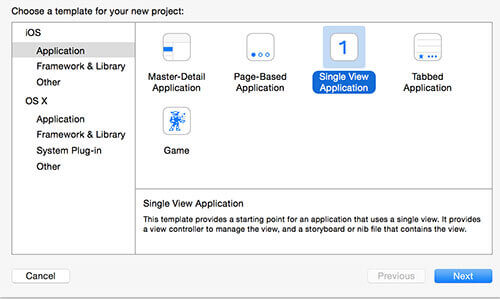
Let's create a new Swift iOS single view project.
In the Main.storyboard you can disable the use size classes option.
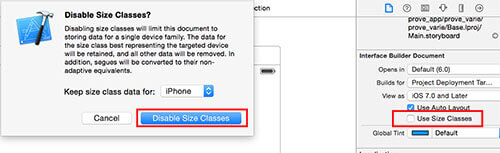
Now you can remove the View controller that is inside the storyboard as default, we don't need that!
Define the layout and the custom classes
In the Main.storyboard you've to add the UITableViewController element.
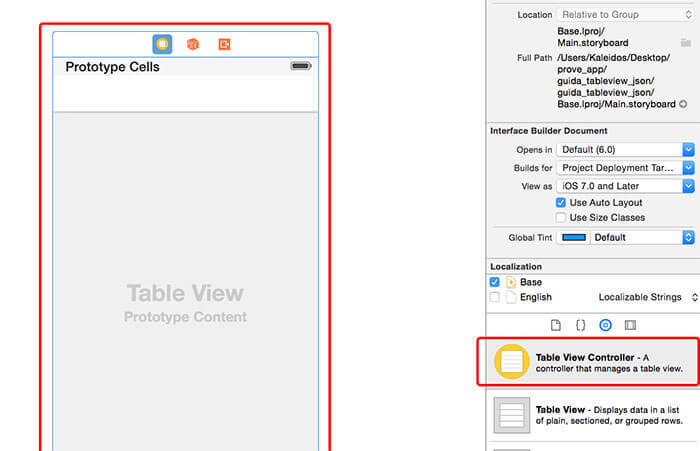
Now you've to set a custom class for the UITableViewController that allows you to manage the data that will be displayed.
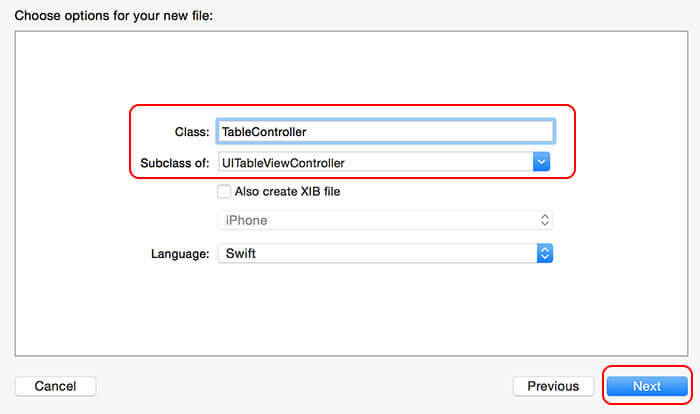
Create a new iOS Cocoa Touch Class and set the subclass as UITableViewController and the name of the class as TableController and create it.
Now in the Main.storyboard select again your UITableViewController and in the identity inspector set the TableController class that you've prevously created.

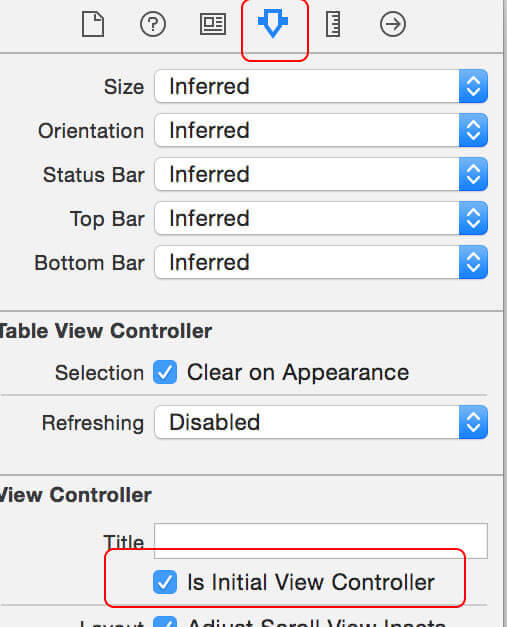
In the Attribute inspector turn on the is initial view controller option.
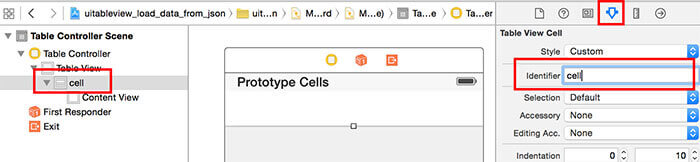
Now you have to select the table view cell and under the attribute inspector set the identifier to cell.
TableController custom class
Now you've to implement the table controller class. This class is the core of the table. Here you'll define the download function, the json extractor function and finally the cell definition.
The first thing you've to do is to define the array that will be used to store and read the data. Let's define the TableData String array as:
var TableData:Array< String > = Array < String >()The viewDidLoad() is the function that will be called as soon as the view has been loaded. Inside it you should call the get_data_from_url function. We will define this function later, but let's add the function call placeholder.
var TableData:Array< String > = Array < String >()
override func viewDidLoad() {
      super.viewDidLoad()
      get_data_from_url("http://www.kaleidosblog.com/tutorial/tutorial.json")
}
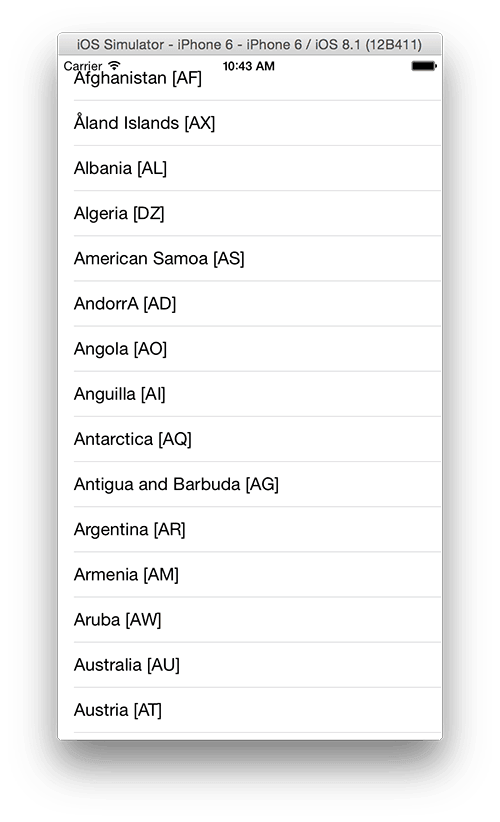
At this link I've prepared for you a json object. This is a simple list of countries and countries' codes. If you want use this easy tool to explore this structure in a readable format.
Set the number of sections to 1 and the number of rows to the array's size.
override func numberOfSectionsInTableView(tableView: UITableView) -> Int {
     return 1
}
override func tableView(tableView: UITableView, numberOfRowsInSection section: Int) -> Int {
     return TableData.count
}
Configure now the cell to load the array string at the position defined by the indexPath object. The "cell" identifier is the same identifier name that you previously set for the cell element. The cellForRowAtIndexPath function is called for every cell that is visible on the screen at a particular moment. So, for example, if you have to load 200 cells on your table, this function is called only 10-15 times, that's because only the elements that have to be displayed are loaded. Every time you scroll your table, this function is called again for the items that have to be displayed.
In this case we'll use the textlabel that is defined in the default cell layout.
override func tableView(tableView: UITableView, cellForRowAtIndexPath indexPath: NSIndexPath) -> UITableViewCell {
     let cell = tableView.dequeueReusableCellWithIdentifier("cell", forIndexPath: indexPath) as! UITableViewCell
     cell.textLabel?.text = TableData[indexPath.row]
     return cell
}
let's define now the get_data_from_url function by exploiting the iOS asynchronous call.
func get_data_from_url(url:String)
{
    let httpMethod = "GET"
    let timeout = 15
    let url = NSURL(string: url)
    let urlRequest = NSMutableURLRequest(URL: url!,
    cachePolicy: .ReloadIgnoringLocalAndRemoteCacheData,
    timeoutInterval: 15.0)
    let queue = NSOperationQueue()
    NSURLConnection.sendAsynchronousRequest(
                                  urlRequest,
                                  queue: queue,
                                  completionHandler: {(response: NSURLResponse!,
                                                                   data: NSData!,
                                                                   error: NSError!) in
             if data.length > 0 && error == nil{
                 self.extract_json(data!)
             }else if data.length == 0 && error == nil{
                 println("Nothing was downloaded")
             } else if error != nil{
                 println("Error happened = \(error)")
             }
         }
     )
}
When the get_data_from_url function has done the download of the json data, the extract_json function is called. Let's now implement it. This function will extract the json data and fill the TableData array. In a JSON format there are two different main types: the array and the objects. Arrays are identified by the [ ] brackets while the object are identified by the { } brackets. This two types in Swift are defined by NSArray and NSDictionary respectively. For every JSON object you've to define a safe variable (using let and the question mark) with the right type. The json used in this example has this structure:
array
Object
name (String)
code (String)
...
Object
name (String)
code (String)
Let's now implement the extract_json function.
func extract_json(jsonData:NSData)
{
     var parseError: NSError?
     let json: AnyObject? = NSJSONSerialization.JSONObjectWithData(jsonData, options: nil, error: &parseError)
     if (parseError == nil)
     {
        if let countries_list = json as? NSArray
        {
           for (var i = 0; i < countries_list.count ; i++ )
           {
               if let country_obj = countries_list[i] as? NSDictionary
               {
                   if let country_name = country_obj["country"] as? String
                   {
                       if let country_code = country_obj["code"] as? String
                       {
                             TableData.append(country_name + " [" + country_code + "]")
                       }
                   }
                }
            }
        }
     }
     do_table_refresh();
}
Finally we have the data into our TableData array, we only have to refresh the table in the main thread.
func do_table_refresh()
{
     dispatch_async(dispatch_get_main_queue(), {
         self.tableView.reloadData()
        return
     })
}
You can download the code for this example here.
UPDATE: download the swift 3 code example from here
Comments 90
Comments are closed: this is a read-only archive.

I want show news that came from my database website into application.
I create table in my mysql database and I create news page with Image and detail and now I want connect application to news page of my website
and every time I create new News when user reload the application can see the news page.
could you please help me ?
thank you so much
override func tableView(tableView: UITableView, cellForRowAtIndexPath indexPath: NSIndexPath) -> UITableViewCell {
let cell: UITableViewCell = UITableViewCell(style: UITableViewCellStyle.Subtitle, reuseIdentifier: "cell")
cell.textLabel?.text = tableData[indexPath.row] // I can only retrieved data for textLabel works fine !
cell.imageView?.image = UIImage(named: ?????) // ???? I dont know how to field this
cell.detailTextLabel?.text = ???? // ???? I dont know how to field this
}
my json return data like this:
{"title": "My Title", "Description": "My Description", "Image": "My image"}
Thanks for your answer.
Robin
you have to define an array with a custom struct with the image link, description, title..every field you need. for the image you can set in your json data the link of the image then read it as a string and download it in an asynchronous way. If you need an example, tell me.
/* In the same Cell */
TextLabel = to show the title
detailTextLabel = to show the description
imageView = to show a thumbnail
below my complete code :
import UIKit
class SecondViewController: UITableViewController, UITableViewDataSource, UITableViewDelegate, UISearchResultsUpdating {
@IBOutlet weak var activityIndicator: UIActivityIndicatorView!
@IBOutlet weak var activityIndicatorText: UILabel!
@IBOutlet weak var activityIndicatorView: UIView!
var tableData:Array< String > = Array < String >()
let LocalData:NSUserDefaults = NSUserDefaults.standardUserDefaults()
//SEARCH///////////////////
var filteredTableData = [String]()
var resultSearchController = UISearchController()
//SEARCH///////////////////
override func viewDidLoad() {
super.viewDidLoad()
// Do any additional setup after loading the view, typically from a nib.
get_data_from_url("http://www.rtzauto.ch/application/ACCESSOIRES_JSON2.php")
self.tableView.contentInset = UIEdgeInsetsMake(0, 0, 0, 0);
//SEARCH/////////////////
self.resultSearchController = ({
let controller = UISearchController(searchResultsController: nil)
controller.searchResultsUpdater = self
controller.dimsBackgroundDuringPresentation = false
controller.searchBar.sizeToFit()
self.tableView.tableHeaderView = controller.searchBar
return controller
})()
self.tableView.reloadData()
//SEARCH//////////////////
}
override func viewWillAppear(animated: Bool) {
super.viewWillAppear(animated)
var nav = self.navigationController?.navigationBar
nav?.barStyle = UIBarStyle.Black
nav?.tintColor = UIColor.whiteColor()
nav?.titleTextAttributes = [NSForegroundColorAttributeName: UIColor.whiteColor()]
}
func get_data_from_url(url:String)
{
let httpMethod = "GET"
let timeout = 15
let url = NSURL(string: url)
let urlRequest = NSMutableURLRequest(URL: url!,
cachePolicy: .ReloadIgnoringLocalAndRemoteCacheData,
timeoutInterval: 15.0)
let queue = NSOperationQueue()
NSURLConnection.sendAsynchronousRequest(
urlRequest,
queue: queue,
completionHandler: {(response: NSURLResponse!,
data: NSData!,
error: NSError!) in
if data.length > 0 && error == nil{
let json = NSString(data: data, encoding: NSUTF8StringEncoding)
self.extract_json(json!)
}else if data.length == 0 && error == nil{
println("Nothing was downloaded")
} else if error != nil{
println("Error happened = \(error)")
}
}
)
}
func extract_json(data:NSString)
{
var parseError: NSError?
let jsonData:NSData = data.dataUsingEncoding(NSUTF8StringEncoding)!
let json: AnyObject? = NSJSONSerialization.JSONObjectWithData(jsonData, options: nil, error: &parseError)
if (parseError == nil)
{
if let vehic_list = json as? NSArray
{
for (var i = 0; i < vehic_list.count ; i++ )
{
if let vehic_obj = vehic_list[i] as? NSDictionary
{
if let vehic_marque = vehic_obj["techniques_marque"] as? String
{
if let vehic_modele = vehic_obj["techniques_count"] as? String
{
tableData.append(vehic_marque)
// I can only retrieve one object at a time how to retrieve many object in the same row using tableData.append ???
}
}
}
}
}
}
do_table_refresh()
}
func do_table_refresh()
{
dispatch_async(dispatch_get_main_queue(), {
self.activityIndicator.hidesWhenStopped = true
self.activityIndicatorView.hidden = true
self.activityIndicatorText.hidden = true
self.tableView.reloadData()
return
})
}
override func numberOfSectionsInTableView(tableView: UITableView) -> Int {
return 1
}
override func tableView(tableView: UITableView, numberOfRowsInSection section: Int) -> Int {
if (self.resultSearchController.active) {
return filteredTableData.count
}
else {
return tableData.count
}
}
override func didReceiveMemoryWarning() {
super.didReceiveMemoryWarning()
// Dispose of any resources that can be recreated.
}
override func tableView(tableView: UITableView, cellForRowAtIndexPath indexPath: NSIndexPath) -> UITableViewCell {
let cell: UITableViewCell = UITableViewCell(style: UITableViewCellStyle.Subtitle, reuseIdentifier: "cell")
if (self.resultSearchController.active) {
cell.textLabel?.text = filteredTableData[indexPath.row]
// Disclosure show
cell.accessoryType = UITableViewCellAccessoryType.DisclosureIndicator
return cell
}
else {
cell.textLabel?.text = tableData[indexPath.row]
// Disclosure show
cell.accessoryType = UITableViewCellAccessoryType.DisclosureIndicator
return cell
}
}
func updateSearchResultsForSearchController(searchController: UISearchController)
{
self.filteredTableData.removeAll(keepCapacity: false)
let searchPredicate = NSPredicate(format: "self contains[c] %@", searchController.searchBar.text)
let array = (tableData as NSArray).filteredArrayUsingPredicate(searchPredicate)
self.filteredTableData = array as! [String]
self.tableView.reloadData()
}
// Line separator appears under image into tableView
override func tableView(tableView: UITableView, willDisplayCell cell: UITableViewCell, forRowAtIndexPath indexPath: NSIndexPath) {
cell.separatorInset = UIEdgeInsetsZero
}
override func tableView(tableView: UITableView, didSelectRowAtIndexPath indexPath: NSIndexPath) {
//let modelsArray : NSMutableDictionary = self.tableData[indexPath.row] as! NSMutableDictionary
//var modelSelected = modelsArray["data"]!["techniques_marque"] as? String
//LocalData.setObject(modelSelected, forKey: "ModelsVehic")
self.performSegueWithIdentifier("VehicToModelsSegue", sender: self)
}
}
when using the example above this working fine but i can only retrieve one object at "tableData.append(vehic_marque)"
loading it in the tableView at
cell.textLabel?.text = tableData[indexPath.row]
cell.detailTextLabel?.text = ??? <--- vehic_model
cell.ImageView?.image = UIImage(named: myimge) ???? <-- vehic_logo
many Thanks
Robin
Nice tutorial, just a question, how can i change the strings and apply them to Title and subtitle? not all in the same row, thank you!
Could anybody please help me regarding this.
array contains array of objects in json format. Wanted to show in the table view where every row shows 4 string in 4 labels.
I am able to display 1 label in each row.
Thanks in advance.
Thanks a lot for the tutorial
When i run my app i get a blank table, i am using xcode 7 and i used your swift 2 code, as a test i made an array of fruits and they were displayed in the table, but when i am using the TableData array nothing is displayed.
Can you help me fix this please.
Thanks in advance.
TableView[3483:576754] App Transport Security has blocked a cleartext HTTP (http://) resource load since it is insecure. Temporary exceptions can be configured via your app's Info.plist file.
Thank you very very much for your fast respond, it is working fine.
let json: AnyObject? = NSJSONSerialization.JSONObjectWithData(jsonData, options: nil, error: &parseError)
Extra argument 'error' in call
Can you help me fix this,
Thanks
Extra argument 'error' in call
in this line:
let json: AnyObject? = NSJSONSerialization.JSONObjectWithData(jsonData, options: nil, error: &parseError)
Thanks
Great tutorial - thanks. One problem I hope you can help with. The line 'let json: AnyObject? = NSJSONSerialization.JSONObjectWithData(jsonData, options: nil, error: &parseError)' generates an error 'extra argument 'error' in call'
If I remove error I get the error 'Call can throw..... and the error is not handled'
I am using swift 2.0 IOS 9
Any ideas?
Cheers
love your tutorial, nice and easy to follow, but im very new to coding,
i couldnt get following working:
func get_data_from_url(........
CompleteionHandler:{......
and
func extract_json(data:NSString)
got an error on &parseError
hi Chris,
it is possible to share the amended code?
Many thanks
NSAppTransportSecurity
NSAllowsArbitraryLoads
on the info.plist
This has been an extremely helpful tutorial, thanks. I am trying to parse a file that is formatted like this but I can't work out how to get the objects into a swift array. heres the json.. any help is appreciated.
{
"LRKSFOweekdayDep": [{
"dep": ["5:45", "6:35", "7:00", "7:30", "7:50", "8:20", "8:40", "9:15", "10:10", "11:10", "12:40", "14:15", "14:50", "15:40", "16:10", "17:10", "17:40", "18:40", "19:25", "20:50"]
}]
"LRKSFOweekendDep": [{
"dep": ["9:30", "11:40", "13:40", "16:45"]
}]
}
please i made a button and i want when i click the button data reload again
like this
//////
@IBAction func refreshAction(sender: AnyObject) {
get_data_from_url(json_data_url)
}
//////
when i do that the data not change please help thank you
but I can't solve my problem yet
I sent The project with email
and thank you again for helping
The download link service you use (linkshrink) is super malware-y. It won't let me through to the files at all but gives me fake virus warnings (with 349085 popups and even audio, wth). Sucks. :(
Why not just put the code on e.g. GitHub (Gist?).
Im getting an error on line
"tableview.dataSource = self" in viewDidLoad(), ViewController.swift
ERROR: "fatal error: unexpectedly found nil while unwrapping an Optional value (lldb)"
Any idea why this is happening?
I now have a working bit of my app. Thanks!
NSURLConnection.sendAsynchronousRequest(
urlRequest,
queue: queue,
completionHandler: { (response: NSURLResponse!, data: NSData!, error: NSError!) -> Void in
Cannot convert value of type '(NSURLResponse!, NSData!, NSError!) -> Void' to expected argument type '(NSURLResponse?, NSData?, NSError?) -> Void'
i don't knew how solve this, can you help me.
"fatal error: unexpectedly found nil while unwrapping an Optional value
(lldb)" in the AppDelegate and EXC_BAD_INSTRUCTION (code EXC_I386_INVOP, subcode = 0x0) can you please help me.
https://github.com/zeta1178/Test.git
Could you provide some assistance?Thanks
Can you help me add hyperlinks (pulled from the JSON) to the cell rows? Basically clicking on the table rows to link to a web page in safari. Thanks
error is ambiguous reference to member tableview
These tutorials are exactly what I've been looking for, especially your update to Swift 3. Your code is so easy to read and your JSON is formatted exactly like the JSON I'm working with. I'm now going to try to move the data into the model, which will be a struct. I've also found your URLSession post/get version and want to use that to post data back to my server for dumping into MySQL. How would I go about putting the data together to send to the server for posting as JSON, for example using your country object in the JSON example. Thanks in advance.
Thanks
Thanks!
For example, if I clic on Argentina cell I want to display some aditional information from Argentina, but in another tableview. I want to do this, with all the countries (working with Json file, as you did it in your awesome tutorial).
Help me plesae, how can I do that?
var dictionary = [
{
"name" : "Office Bearer",
"members":[
{
"name" : "Ashok Kr. Goyal",
"designation" : "President"
},
{
"name" : "Rajesh Agarwal",
"designation" : "Vice President"
},
{
"name" : "Girish Chand Goyal",
"designation" : "Vice President"
},
{
"name" : "Rajeev Kr. Agarwal",
"designation" : "Treasurer"
}
]
},
{
"name" : "Members",
"members":[
{ "name" : "Abhishek Agarwal" },
{ "name" : "Anil Agrawal Das"},
{ "name" : "Anil Kumar Agarwal" },
{ "name" : "Anil Mittal" },
{ "name" : "Anoop Agarwal" },
{ "name" : "Anuj Mangal" },
{ "name" : "Anup Goyal" },
{ "name" : "Dinesh Jain" },
{ "name" : "Dr. SK Sahani" },
{ "name" : "Gopal Khandelwal"},
{ "name" : "Mahesh Chand Agarwal" },
{ "name" : "Mukesh Garg" },
{ "name" : "Murari Lal Goyal" },
{ "name" : "Naresh Garg" },
{ "name" : "Navneet Singhal" },
{ "name" : "Raj Kumar Jain" },
{ "name" : "Rajeev Bansal" },
{ "name" : "Rakesh singhal" },
{ "name" : "Ravi Agarwal"},
{ "name" : "Sanjay Goyal" },
{ "name" : "Shyam Sunder Agarwal" },
{ "name" : "Surendra Kumar Jain" },
{ "name" : "Sushil Bansal" },
{ "name" : "Vishnu Kumar Garg" }
]
},
{
"name" : "Members",
"members":[
{ "name" : "Prahlad Kr. Agarwal" },
{ "name" : "Puran Dawar"},
{ "name" : "Shrikishan Goyal" }
]
}
]
This is the array of dictionaries I want to show the name s of the arrays as Section header and every section have no of members thats why i made array of members which i have to show in UITableViewCell.
So please tell me how to do it.
the image you need (http://www.kaleidosblog.com/uitableview-custom-cell-how-to-define-a-custom-cell-with-swift-in-ios). Then donwload your data, fill your custom data structure with the data, and refresh the table. When you fill your cell, you'll have to cast the UITableCellView into your custom cell, access to the variables linked using the assistand editor and fill everything! A bit summarized :) but hope it helps!
Hello Everyone
Recently I bought a set of 12 books Learn IOS, tutorial by Ray Wenderlich , And now I want to transfer it to you for $ 60 payment via Paypal, All books are the latest version that supports swift 3 and have full source code. I will share it for you for $ 60 Includes pdf and full source code, you can download on Google Drive, when the book has a new version i will get it for you
if you are interested, please contact me by Email: [email] or skype: tvtruong91.
Thank you
You can see the full description at http://www.prograbooks.com/2017/05/download-all-books-learn-ios-by-ray.html
1. RxSwift Reactive Programming with Swift First Edition Ray Wenderlich
2. Advanced Apple Debugging & Reverse Engineering
3. Swift Apprentice Second Edition Begin Programming with Swift 3 Ray Wenderlich
4. Ios Apprentice Fifth Edition Begin IOS development with Swift 3 Ray Wenderlich
5. Tvos Apprentice Second Edition Begin TvOs development with Swift 3 Ray Wenderlich
6. Ios 10 By Tutorials First Edition Learning the new IOS 10 APIs with Swift 3 Ray Wenderlich
7. WatchOs By Tutorials Second Edition Making Apple Watch apps with watchOS 3 & Swift 3 Ray Wenderlich
8. Core Data By Tutorials Third Edition IOS 10 and Swift 3 edittion Ray Wenderlich
9. Ios Animations By Tutorials Third Edition IOS 10 and Swift 3 edition Ray Wenderlich
10. 2D Apple Games By Tutorials Begin 2D IOS & tvOS Game Development with Swift 3 Ray Wenderlich
11. 3D Apple Games By Tutorials Begin 3D IOS & tvOS Game Development with Swift 3 Ray Wenderlich
12. Unity Games By Tutorials Make 4 complete unity games from scratch Using C# Ray Wenderlich
select * from table1
Can I use NSURLSession and How?